
Set Belt Tension
The Set Belt Tension tool adjusts the minimum and maximum belt tension to your liking, by hand. The belt tensioner works within these two limits while you drive.
The Auto Calibration tool does the same for you, and is the quicker way to get started. Use Set Belt Tension when you want to set each limit yourself.
Run this tool:
The first time you use the belt tensioner
After adjusting the seat or the harness
When another driver takes your place
Caution
The shoulder straps move while this tool is in use. Stay seated and keep your hands away from the shoulder straps and the belt tensioner.
Before you start
Get seated as you would when driving
Put on the harness and fasten it somewhat loose
Make sure both shoulder straps are even in length
Steps
Open the Devices page and select the belt tensioner
Press Set Belt Tension
Press Activate. The belt tensioner is now powered and follows the sliders.
Increase Pre-tension until the harness is tight, but comfortably so. This is the tension used for long stretches during a race.
Increase Max-tension until the harness is very tight. This is the maximum tension applied during heavy braking.
Press Save
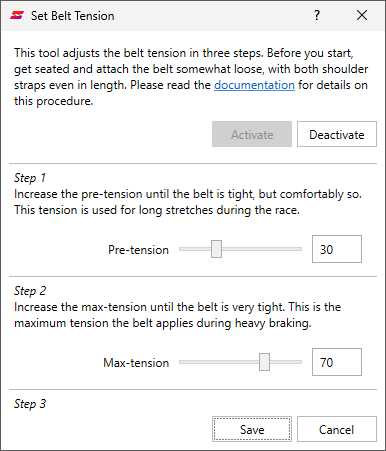
The shoulder straps follow the slider you are moving. Move the Pre-tension slider again to feel the difference between the two.
Max-tension must be higher than Pre-tension. The Save button is disabled otherwise.
Press Deactivate to release the harness at any time. Press Cancel to close the tool and keep your previous tension.
Note
Both sliders start at 0 % every time the tool is opened. Your previous tension is kept until you press Save.
Note
Motion is disabled when this tool is opened. Press the Enable button to enable motion again when you are done.
Troubleshooting
- The harness is too tight during braking:
Run the tool again and choose a lower Max-tension.
- The harness is slack while driving straight:
Run the tool again and choose a higher Pre-tension.
- The harness does not get as tight as expected:
The tension limiter may be set too low.