
Auto Calibration
The Auto Calibration tool sets the belt tension for you. The shoulder straps tighten until they pull with the target force. That position becomes the pre-tension, the tension used for long stretches during a race. The max-tension, applied during heavy braking, is set above it by the spread.
Each shoulder strap is calibrated on its own, so a small difference in strap length is taken care of.
Run this tool:
The first time you use the belt tensioner
After adjusting the seat or the harness
When another driver takes your place
Caution
The shoulder straps move while this tool is in use. Stay seated and keep your hands away from the shoulder straps and the belt tensioner.
Steps
Get seated and buckle up. The harness should be loose enough for a fist to fit between the harness and your body.
Open the Devices page and select the belt tensioner
Press Auto Calibration
Lean back into the seat as when driving
Press Calibrate Now
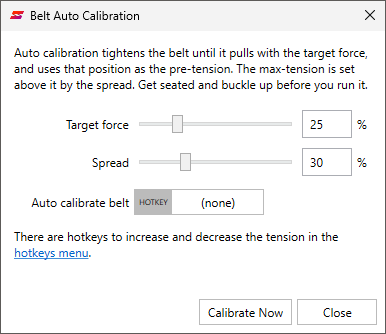
The shoulder straps tighten, and then loosen again. This takes a few seconds. The message Calibration completed is shown when it is done.
Do not tighten the harness by hand after this. Fine tune the tension with the Target force and Spread sliders and run the calibration again, or use the hotkeys below.
Settings
- Target force:
The force the shoulder straps tighten to while calibrating, in percent of the strongest pull of the belt tensioner. The harness should end up tight, but comfortably so.
- Spread:
The distance from pre-tension to max-tension, in percent of the full travel. A larger spread gives stronger effects.
Hotkeys
These hotkeys work from the seat, also in the middle of a race:
- Auto calibrate belt:
Runs the calibration. Get seated and buckle up before you press it.
- Increase belt tension by 2%:
Raises both the pre-tension and the max-tension.
- Decrease belt tension by 2%:
Lowers both the pre-tension and the max-tension.
Troubleshooting
- Calibration failed:
The harness may be too slack for the shoulder straps to reach the target force. Tighten the harness a little and try again.
- Auto calibration is not supported by the firmware of this device:
Upgrade the firmware on the Devices page. Use Set Belt Tension until then.
- The harness feels too loose or too tight while driving:
Change the Target force and run the calibration again, or use the hotkeys.