Project Motor Racing (Console)
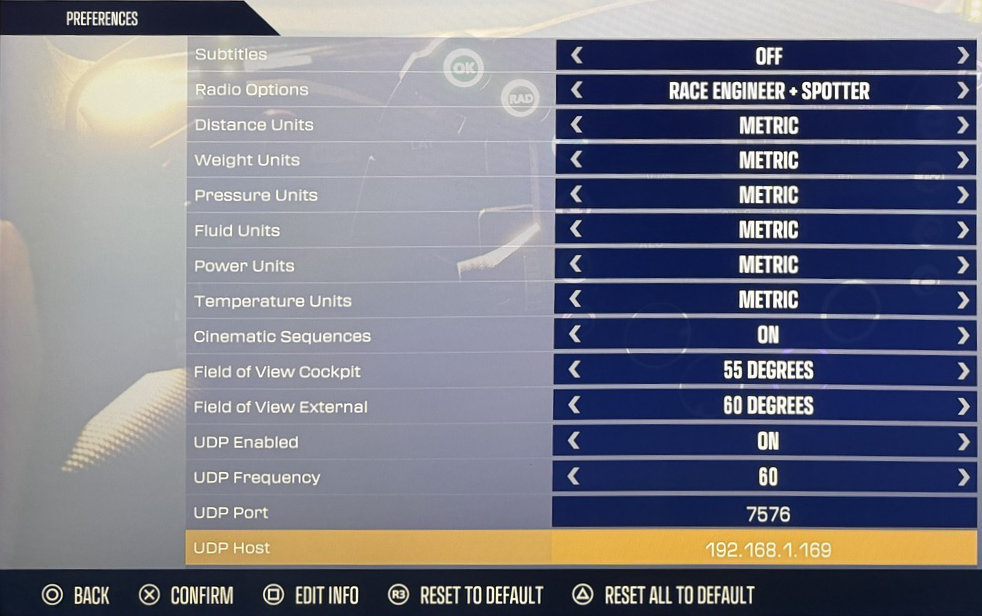
Abilita UDP Telemetry in Preferences:
Avvia Project Motor Racing
Entra in Settings
Entra in Preferences
Imposta UDP Enabled su On
Imposta UDP Frequency su
60(predefinito)Imposta UDP Port su
7576(predefinito, a meno che non sia configurato diversamente in Simrig Control Center)Imposta UDP Host su l’indirizzo IP del tuo PC, ad esempio
192.168.2.111Seleziona manualmente Project Motor Racing come sorgente di telemetria in SIMRIG Control Center (vedi Selezione della sorgente di telemetria)
Fatto