Project Motor Racing (Konsola)
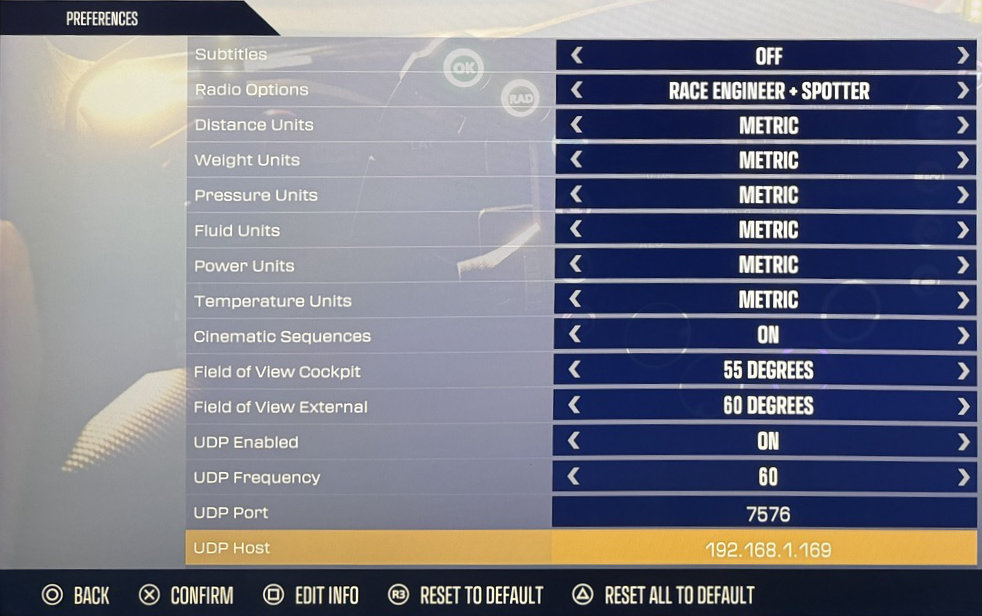
Włącz UDP Telemetry w Preferences:
Uruchom Project Motor Racing
Wejdź w Settings
Wejdź w Preferences
Ustaw UDP Enabled na On
Ustaw UDP Frequency na
60(domyślnie)Ustaw UDP Port na
7576(domyślnie, chyba że skonfigurowano inaczej w Simrig Control Center)Ustaw UDP Host na your PC’s IP address, na przykład
192.168.2.111Ręcznie wybierz Project Motor Racing jako źródło telemetrii w SIMRIG Control Center (zobacz Wybór źródła telemetrii)
Gotowe