Project Motor Racing (Konsole)
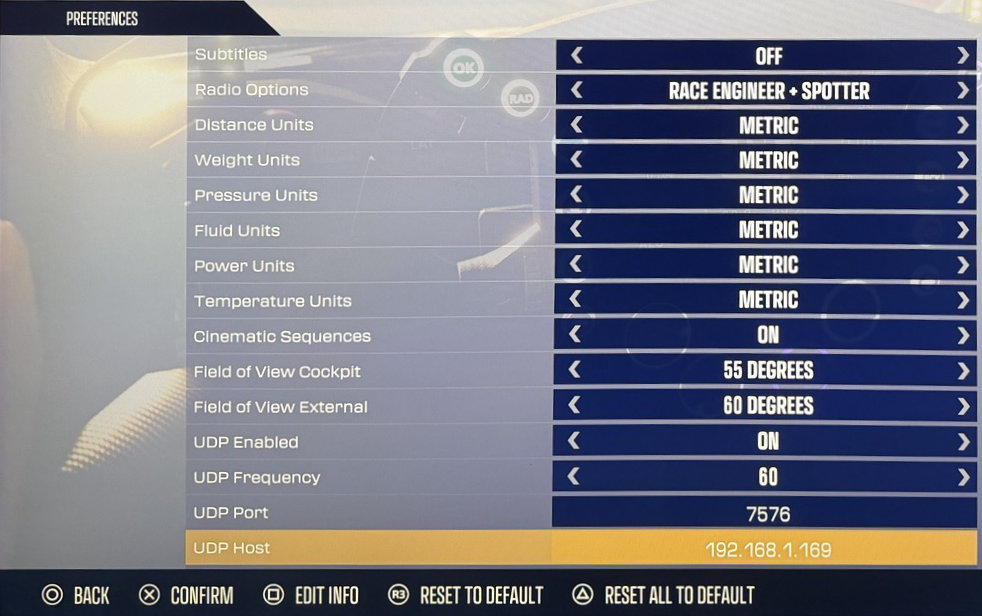
Aktivieren Sie UDP-Telemetrie in Preferences:
Starten Sie Project Motor Racing
Öffnen Sie Settings
Öffnen Sie Preferences
Setzen Sie UDP Enabled auf On
Setzen Sie UDP Frequency auf
60(Standard)Setzen Sie UDP Port auf
7576(Standard, sofern nicht anders im Simrig Control Center konfiguriert)Setzen Sie UDP Host auf your PC’s IP address, zum Beispiel
192.168.2.111Wählen Sie manuell Project Motor Racing als Telemetriequelle im SIMRIG Control Center (siehe Auswahl der Telemetriequelle)
Fertig