
Live for Speed
Tip
Deze stappen worden automatisch geverifieerd en uitgevoerd door SIMRIG Control Center. Start de game en volg de prompts issued van SIMRIG Control Center. Of gebruik de auto-configure tool op de Instellingenpagina.
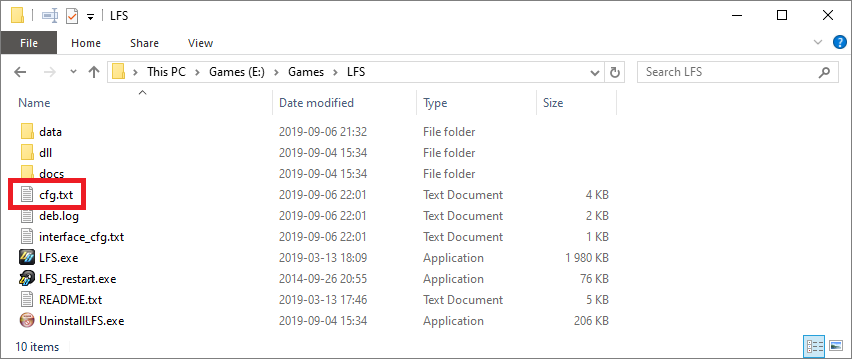
Bewerk cfg.txt om telemetrie in te schakelen:
Sluit Live for Speed
Navigeer naar je LFS-installatiemap (standaard is dit
C:\LFS)Open
cfg.txtmet Kladblok
Voeg dit onderaan het bestand toe:
OutSim Mode 1
OutSim Delay 1
OutSim IP 127.0.0.1
OutSim Port 30000
OutSim ID 0
OutGauge Mode 1
OutGauge Delay 1
OutGauge IP 127.0.0.1
OutGauge Port 30001
OutGauge ID 0
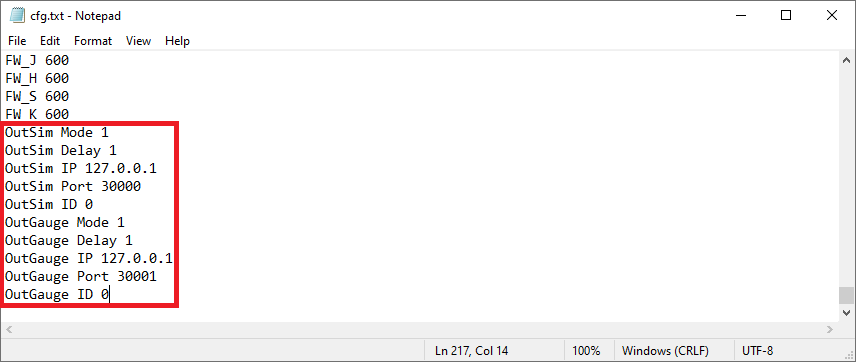
Sla het bestand op
Klaar